Category: SQL

Surprise SQL Server 2012 Feature: “It’s Like Siri….For SQL Server.”

In conjunction with the official release of SQL Server 2012 today, Microsoft has announced a surprise feature that was kept under wraps for three years. Casper Marley, Senior Program Manager for Microsoft’s newly announced Whimsical Products division put it this way, “It’s like Siri…for SQL Server.” “Siri,” Apple’s intelligent assistant that ships with the IPhone 4S, responds audibly not only to voice commands, but questions as well. He then quickly put his IPhone back in his pocket as several members of the Windows Phone team strolled by the well-windowed conference room in which this interview took place.

“Here is one example which integrates with the Query Optimizer,” he said, excitedly sitting up straighter in his chair. He then went on to explain that this new feature, when detecting your tuning has resulted in a plan that is ten or more times more performant than the previous plan for that query, will play a .wav file that sounds like the sizzling of bacon on a griddle. “It’s our way of providing the immediate feedback that you’re really cookin’ now.”

“Another example,” explained Marley, “has been plugged into Resource Governor. When a user is affected by RG, they will now get an audible “No resources for you!” He sat back and chuckled at the brilliance of intertwining comedy and databases.

One feature of this new tool is somewhat controversial. “We all know what happens when you shrink a database, right?” Marley then sipped his coffee for several seconds, clearly building suspense. “Well, when you actually execute a SHRINK on a database, your screen will go dark for a moment. During that time, you will hear high pitched meows and some thumps. Then a well-known, bearded SQL Server expert will appear on the screen, a single tear on his cheek.” He then explained that this expert will then hold up a small furry object and say, “YOU SEE!? See what you did!?” How that made it passed QA, I will never know.

There are some Easter Eggs in there as well. Marley turned to his laptop and said, “Watch this one.” He opened a query window and executed a differential backup of a database. The screen got fuzzy for a moment and then an alien humanoid appeared. Below this alien were the words, “All your differential base are belong to us.”

“I’ll show you one last feature, “ Marley said, turning back to his laptop. He opened a new query editor window and wrote a query against a table that gets a lot of writes. Then, to my astonishment, he put a NO LOCK hint on that table. As soon as he executed his query, there was a loudly audibly “YOU FOOL!” as shouted by Gilbert Gottfried on a famous episode of Hollywood Squares.

Marley, clearly delighted with himself, closed the lid of his laptop and stood to shake my hand, signaling the end of the interview. “We’ll let the users find the rest.”

Well, there you have it. It only remains to see what the SQL community will make of these changes.


Upcoming Presentation: MADPASS Meeting April 25th

After attending a great SSRS session by Jes Schultz Borland (blog | Twitter) at the 2011 PASS Summit (SQUEE!), I mentioned to Jes that one of my goals for 2012 is to present more. Well, lo and behold, she invited me to present at MADPASS , the PASS chapter in Madison, WI. SQL Community in action. Thanks, Jes. 🙂

I shall be presenting at the MADPASS meeting on April 25th with a brand new topic for me MDX Trek: First Contact. As you can imagine, it’s a Star Trek themed introduction to MDX.

Who’s got two thumbs and is a giant nerd? This guy.

Facing The Challenge: Designing a BI Infrastructure With SQL 2008 (70-452)

On Monday, Feb 6th, I passed exam 70-452, Designing a Business Intelligence Infrastructure Using Microsoft SQL Server 2008. Hazzah. I am really excited about that, not because I get a shiny new MCITP certification, but because it validates how much I have learned. When I started working with SQL Server about 5 years ago, I started down the DBA track, even earning an MCITP in the SQL Server 2005 DBA track. It was not too long after that when I determined that Business Intelligence was where I really wanted to hang my career hat.

This post isn’t really about that, though. I have a process that I use to learn the material. I then use the exams to measure that learning. The process I have has worked pretty well. Actually, I am 6 for 6 when I commit to this process. Since it seems to work really well for me, I thought I would share it in case it may help someone else as well.

Typically, I like to use the Microsoft Press Self-Paced exam guides. I find them to be a great starting point and cover the key areas of the technology in question. In the case of exam 70-452, as of the time of this writing, there is not a Microsoft Press exam guide for that exam. Therefore, I instead chose Delivering Business Intelligence with Microsoft SQL Server 2008 by Brian Larson. I found it to be a great base for my prep for 70-452. In areas where I felt I needed to go deeper, I turned to Books Online.

My process consists of a few key steps.

1. I go through the text taking notes on the details of each topic. I make sure to make my notes in my own words and avoid taking anything word for word from the text. This helps a lot in that I must process the information more than once as I go.

2. The books I have used have all featured do-it-yourself style exercises during which you put what you learned into practice. I find this really valuable to gain at least some experience, particularly with skills I have never used in real life.

3. I read through the notes several times over, just like studying for test back in school.

It does not seem like much and certainly is not very elaborate. There are no tesla coils involved or anything. But sometimes it is the simple things people overlook.

Since I titled this post “Facing The Challenge,” I figured I should also show some of the faces I used during the process outline above.

 Confusion. Some of the content was confusing at first.


 Determination. I knew I had to commit myself to understanding all the concepts.


 Realization. Ah. NOW I get it.


 Blue Steel.


 Satisfaction. I passed. I dun learned something.


Well, there you have it.

Yes, Virginia, There Is A SQL-Themed Holiday Song

“Dear Mr. VSQL, I am 8 years old. My friends tell me that there are no SQL-themed holiday songs. My Dad says ‘If it’s on the Internet, it has to be true.’ Do you know of any SQL-themed holiday songs on the Internet I can show them?”

– Virginia O’Hanlon

Virginia, your friends have been misinformed. Please see below this song titled O Release Night, which is a SQL-themed version of the popular O Holy Night. Please feel free to show this to your friends. And, if they choose to start subscribing to my RSS feed, that would be fine, too. I hope you enjoy it and may you and yours stay safe and well this holiday season.

O release night, the maintenance window’s open.
It is the time to run my deployment scripts.
There’s DDL, and DML and stored procs
And functions and triggers, well, I hope not.
I load the file and connect to the DB.
With joyful hope, I hit the F5 key.

Fall on my knees to see the Messages pane!
An error in red, O M G, W T F!
Last night, I tested, twelve frickin times!

I go to the line referenced in the exception
And see where the Engine thinks I went wrong.
Led by the guidance of the crimson text
I find a difference between Test and Prod.
While deep in thought, I glance down at the systray
And see the date’s not what I thought it was.

I now need to stop and rollback all my changes.
Success! Success! I’ve undone all that I did.
I’m off to bed. This is not my release night!

TIE Fighters and sys.types: “There’s Too Many of Them!”

Y-Wing As the Y-Wing pilot in Star Wars: Episode VI – Return of the Jedi proclaimed, sometimes there’s too many of them. He was referring to TIE Fighters during the assault on the second Death Star. I echoed the sentiment while querying the system catalog for a client’s database. I was building the foundation for a data dictionary (at the end of the project, unfortunately) and started by pulling a list of all the fields in the database along with their data types. I was dismayed when my tables returned more records than there were fields. There were too many of them.

To show why this happenned, I will start by creating a simple table.


CREATE TABLE dbo.TooManyOfThem

(

      RecordID int NOT NULL

    , RecordName nvarchar(100) NULL

)


Notice that I have an nvarchar field in there. It turns out, that was the culprit. Let’s query the system catalog to return the columns from this table along with their associated data types.

SELECT

      o.name AS TableName

    , c.name As ColumnName

    , t.name AS DataTypeName

FROM sys.columns c

INNER JOIN sys.objects o

ON o.object_id = c.object_id

INNER JOIN sys.types t

ON t.system_type_id = c.system_type_id 

WHERE o.name = 'TooManyOfThem'


Since my TooManyOfThem table has two columns, I would expect to get two records returned by this query. Here’s is what I get.

TableName            ColumnName      DataTypeName

-------------------- --------------- ------------

TooManyOfThem        RecordID        int

TooManyOfThem        RecordName      nvarchar

TooManyOfThem        RecordName      sysname 


(3 row(s) affected)


I have a bad feeling about this. These aren’t the results I’m looking for. Are my fields riding single file to hide their numbers?

My RecordName field is showing up more than once. Notice that the second occurrence has DataTypeName of “sysname.” I reached out with my feelings and modified my query to get more fields returned.

SELECT

      o.name AS TableName

    , c.name As ColumnName

    , c.system_type_id AS C_system_type_id

    , c.user_type_id AS C_user_tpe_id

    , t.system_type_id AS T_system_type_id

    , t.user_type_id AS T_user_type_id

    , t.name AS DataTypeName

FROM sys.columns c

INNER JOIN sys.objects o

ON o.object_id = c.object_id

INNER JOIN sys.types t

ON t.system_type_id = c.system_type_id 

WHERE o.name = 'TooManyOfThem'


When I run this new query, I get the following results.

TableName            ColumnName      C_system_type_id C_user_tpe_id T_system_type_id T_user_type_id DataTypeName

-------------------- --------------- ---------------- ------------- ---------------- -------------- ------------

TooManyOfThem        RecordID        56               56            56               56             int

TooManyOfThem        RecordName      231              231           231              231            nvarchar

TooManyOfThem        RecordName      231              231           231              256            sysname


(3 row(s) affected)


We see that in sys.types, the system_type_id of 231 leads to both “nvarchar” and “sysname.” Let’s write a query to return the types whose system_type_id values appear more than once.

SELECT

      system_type_id

    , user_type_id

    , name

FROM sys.types

WHERE system_type_id IN

(

SELECT

      system_type_id

FROM sys.types

GROUP BY system_type_id

HAVING COUNT(*) > 1

)

We get the following results.

system_type_id user_type_id name

-------------- ------------ ---------------

240            128          hierarchyid

240            129          geometry

240            130          geography

231            231          nvarchar

231            256          sysname


(5 row(s) affected)


As we see, the system_type_id is not unique in sys.types. The user_type_id, however, does not repeat. So, I change my join to the sys.types view from system_type_id to user_type_id.

SELECT

      o.name AS TableName

    , name As ColumnName

    , name AS DataTypeName

FROM sys.columns c

INNER JOIN sys.objects o

ON o.object_id = c.object_id

INNER JOIN sys.types t

ON t.user_type_id = c.user_type_id 

WHERE o.name = 'TooManyOfThem'


Now I get the results I’m looking for.

TableName            ColumnName      DataTypeName

-------------------- --------------- ------------

TooManyOfThem        RecordID        int

TooManyOfThem        RecordName      nvarchar


(2 row(s) affected)


So, the path you choose will certainly affect your destiny. Here’s another path for you: Robot Chicken Star Wars. Seriously. It’s some of the funniest stuff I’ve ever seen.


My Top Ten Lessons From SQL Saturday #31 Chicago

I attended SQL Saturday Chicago this weekend. I had an awesome time and attended great sessions. While I got something good out of every one of the sessions, I decided to distill the entire experience into a top ten list with some of the highlights.

SneakersOnWire

10. According to Google Maps, the distance from Grand station on the CTA Blue Line to Navy Pier is 2.1 miles. I learned this after #8 below.

9. According to Google Maps, the distance from Navy Pier to Grand station on the CTA Blue Line is 2.1 miles. I learned this after #8 below.

8. Just like with shrinking databases, the fact that you CAN walk the distance in #10 above and then walk the distance in #9 above (all in under 2 hours, to ensure you will make it back to the airport in time to catch the last shuttle back to the hotel) does not make it a good idea to do so. AND, just like shrinking a database can affect its future performance, the walk mentioned above created soreness that is definitely affecting my current walking performance. But hey, while I was walking I did what anyone else would do: I asked myself, "What would Forrest Gump do?" Keep on goin’ is what. 

7. A good tip from Jeremiah Peschka ( Twitter | Blog ) is to create variables for commonly used strings (like creating new lines, or escaping single quotes) when building dynamic SQL to keep your code as readable as possible.

6. Kevin Kline ( Twitter | Blog ) pointed out that mixing DDL and DML within a stored procedure will cause recompiles, which can add significantly to resource consumption and execution time.

5. If it is a chilly Friday night in April around 8pm and you buy a churro from the little churro hut on Navy Pier, they may just offer you a second one for free as they are closing up anyway. Sweet. A little fuel for #9 above.

4. Before Andrew Karcher’s ( Twitter | Blog ) presentation on MDX, I knew jack about MDX (I could usually spell it properly, but that’s about it). Now, thanks to him, I don’t know jack anymore. Wait. I mean I now understand the basics that were a mystery to me before. Yeah. The second one.

DevilsTower3. Arie Jones ( Twitter | Blog ) pointed out something I had not read concerning SQL Server 2008 R2 Reporting Services. When exporting to multiple worksheets in Excel, R2 allows you to name those worksheets without sacrificing black cats or running off to Devil’s Tower with Richard Dreyfuss. Hazzah to the product team for adding this. Hazzah, I say!

2. When doing Karaoke in a room full of geeks, requesting Barry Manilow’s Copacabana and substituting Weird Al Yankovic’s Star Wars Cantina lyrics can go over well.

1. Wendy Pastrick ( Twitter ), Ted Krueger ( Twitter ), Jes Borland ( Twitter ), and many others worked hard to put on a great SQL Server event. They succeeded quite well, indeed. Thanks so much to all organizers, volunteers, and presenters.

A Hint on Using Indexed Views For Read Performance

Some time ago, I was on a project in which we implemented a report model. The data was located in several different databases, none of which were very conducive to reporting. The consequence was that the views upon which we based our entities for the model required lots of joins and performed poorly. We decided to implement indexed views in order to boost the read performance and improve the experience for the users. With indexed views, the data returned by the view is persisted in a clustered index, just like a clustered table, which can have great benefits in read performance.

NOTE: You should research and understand the requirements and cost of using Indexed Views before implementing them in your environment. Indexed views incur a cost in terms of write performance, so you will want to test extensively to make sure the gain on reads is worth that write cost.

You can read details about Creating Indexed Views here.

One thing I noticed is that when I first queried the indexed views, the performance didn’t really change. The reason is that the query optimizer typically defaults to expanding the view definition to access the underlying objects directly. I will demonstrate this in a moment. I did find, however, if my index on the view covered all the columns necessary to satisfy my query, then the optimizer did in fact go ahead and use the index on the view instead of expanding.

You can read details about Resolving Indexed Views here.

Let’s demonstrate this behavior I mentioned above where the indexed view does not cover the query.

CREATE TABLE dbo.Musketeer

(

      MusketeerID int NOT NULL 

    , MusketeerName varchar(20) NOT NULL

)


CREATE TABLE dbo.Lackey

(

      LackeyID int NOT NULL

    , MusketeerID int NOT NULL

    , LackeyName varchar(20) NOT NULL

)


CREATE TABLE dbo.Sword

(

      SwordID int NOT NULL

    , MusketeerID int NULL

    , SwordName varchar(20) NOT NULL

)


INSERT INTO dbo.Musketeer VALUES(1,'Athos')

INSERT INTO dbo.Musketeer VALUES(2,'Porthos')

INSERT INTO dbo.Musketeer VALUES(3,'Aramis')


INSERT INTO dbo.Lackey VALUES(1,1,'Grimaud')

INSERT INTO dbo.Lackey VALUES(2,2,'Mousqueton')

INSERT INTO dbo.Lackey VALUES(3,3,'Bazin')


INSERT INTO dbo.Sword VALUES(1,1,'Cutlass')

INSERT INTO dbo.Sword VALUES(2,2,'Rapier')

INSERT INTO dbo.Sword VALUES(3,3,'Epee')


In the code above, we create our tables and insert some data. I chose The Three Musketeers today. NOTE: I made up the data regarding the Sword preferences.

Let’s create our view.

CREATE VIEW dbo.vMusketeerInfo WITH SCHEMABINDING

AS

SELECT

      m.MusketeerID

    , m.MusketeerName

    , l.LackeyName

    , s.SwordName

FROM dbo.Musketeer m

INNER JOIN dbo.Lackey l

ON l.MusketeerID = m.MusketeerID

INNER JOIN dbo.Sword s

ON s.MusketeerID = m.MusketeerID


Let’s query our view, returning the Actual Execution Plan:

SELECT 

      MusketeerID

    , MusketeerName

    , LackeyName

    , SwordName      

 FROM dbo.vMusketeerInfo


/* RESULTS

MusketeerID MusketeerName  LackeyName  SwordName

----------- -------------- ----------- --------------------

1           Athos          Grimaud     Cutlass

2           Porthos        Mousqueton  Rapier

3           Aramis         Bazin       Epee


(3 row(s) affected)

*/


The plan returned is the following:

image


Notice that the Optimizer is doing a Table Scan on each table referenced.

Now let’s create an index on our view:

CREATE UNIQUE CLUSTERED INDEX ix_vMusketeerInfo_MusketeerID

ON dbo.vMusketeerInfo (MusketeerID)

GO


Great. Now that we have an index on our view, we should be all set, right? Let’s query the view again.

SELECT 

      MusketeerID

    , MusketeerName

    , LackeyName

    , SwordName      

 FROM dbo.vMusketeerInfo


/* RESULTS

MusketeerID MusketeerName  LackeyName  SwordName

----------- -------------- ----------- --------------------

1           Athos          Grimaud     Cutlass

2           Porthos        Mousqueton  Rapier

3           Aramis         Bazin       Epee


(3 row(s) affected)

*/


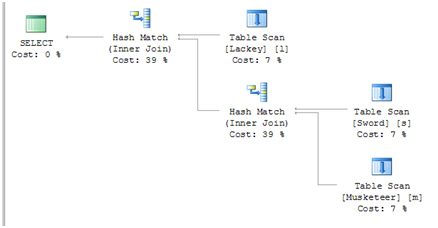
OK. We get the same results, as one would expect. How about the plan?

image


The plan is the same. The Optimizer is still performing Table Scans on each table. SQL Server has expanded the view and accessed the underlying objects directly. If you want to make sure that you are going to use the unexpended view, you can add the WITH (NOEXPAND) hint.

SELECT 

      MusketeerID

    , MusketeerName

    , LackeyName

    , SwordName      

 FROM dbo.vMusketeerInfo WITH (NOEXPAND)


/* RESULTS

MusketeerID MusketeerName  LackeyName  SwordName

----------- -------------- ----------- --------------------

1           Athos          Grimaud     Cutlass

2           Porthos        Mousqueton  Rapier

3           Aramis         Bazin       Epee


(3 row(s) affected)

*/

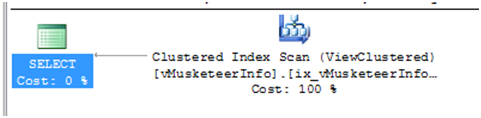
Again, the results are the same. However, we have a new plan.

image


The WITH (NOEXPAND) hint dictates to SQL Server that the view is not to be expanded to the underlying objects. Thus, in our implementation, we achieved a tremendous gain in READ performance. We did incur a cost on write performance, but in our implementation, the benefits to reads greatly outweighed that write cost.