Category: SQL

Finding Foreign Keys

No, this is not a new initiative by United States Immigration and Customs Enforcement. I am talking databases.

I recently found myself in a situation where I wanted to find all the tables that referenced a particular table via foreign key relationships. I had heard that relying on the built-in dependency tracking (right-clicking the object in SSMS and choosing View Dependencies) was not always reliable. Indeed, SQL Server MVP Aaron Bertrand (Twitter) wrote a great blog post about ways in which sysdepends, sp_depends, and sys.sql_dependencies can lose touch with reality.

I figured I could find the info I wanted by querying the system catalog views. Here is the script I wrote using AdventureWorks as the sample DB.

USE AdventureWorks

GO


DECLARE 

      @ReferencedSchema varchar(1000)

    , @ReferencedObject varchar(1000)


SET @ReferencedSchema = 'HumanResources'

SET @ReferencedObject = 'Employee'


SELECT 

      rs.name + '.' + ro.name AS ReferencedObject

    , rc.name AS ReferencedColumn

    , ps.name + '.' + po.name AS ParentObject

    , pc.name AS ParentColumn

    , co.name AS ConstraintName

FROM sys.foreign_key_columns fkc

INNER JOIN sys.objects co

ON co.object_id = fkc.constraint_object_id

INNER JOIN sys.objects ro

ON ro.object_id = fkc.referenced_object_id

INNER JOIN sys.schemas rs

ON rs.schema_id = ro.schema_id

INNER JOIN sys.columns rc

ON rc.object_id = ro.object_id

AND rc.column_id = fkc.referenced_column_id

INNER JOIN sys.objects po

ON po.object_id = fkc.parent_object_id

INNER JOIN sys.schemas ps

ON ps.schema_id = po.schema_id

INNER JOIN sys.columns pc

ON pc.object_id = po.object_id

AND pc.column_id = fkc.parent_column_id

WHERE rs.name = @ReferencedSchema

AND ro.name = @ReferencedObject

ORDER BY 

      ps.name

    , po.name


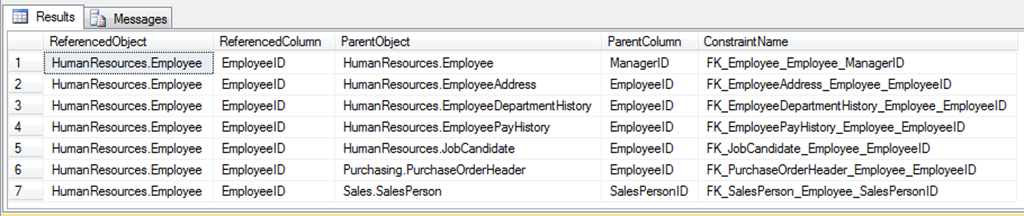
Here are the results I get.

image

You can see that there are 7 foreign key constraints that reference the HumanResources.Employee table in my copy of Adventureworks. You can see that Parent object to which each of these constraints belong. And you can see the actual name of each constraint.

Feel free to take that query and tweak it to add information you would find useful. Also feel free to post it in comments here. I really want my blog to be a two-way street and would love to encourage debate.

I also encourage you to play around with querying the system catalog views. You can find some really cool stuff in there.

Saving Indiana Jones (and your SSIS packages) From “Bad Dates”

I have been working on a project modifying the ETL for a data warehouse. The source is a Pervasive database which, through SSIS 2005 packages, populates a SQL Server 2005 data warehouse and associated SSAS 2005 cubes. I encountered an issue which reminded me of a scene in the first Indiana Jones film, Raiders of the Lost Ark. If you had a nickel for every time you heard of SSIS reminding someone of Indiana Jones….you’d now have….a nickel. Yeah. I’m kind of different.

It was a scene in Cairo where Indy and Sallah had taken the headpiece to the Staff of Ra to an old man who they asked to translate the markings on the object. While they are talking, Indy tosses a date into the air to catch it in his mouth. Sallah, noticing a victim of the dates (poisoned moments before by a nefarious character) laying dead, snatches the date from the air just above Indy’s mouth with the line, “Bad dates.” Sallah saves Indy’s life by preventing the bad date from being consumed. Sounds a lot like an SSIS data flow to me, and you may be starting to see my connection.

In my situation, the source system had allowed invalid dates to populate columns with Date data type. These dates had a year of 0000. My client wanted me to route the records with invalid dates to a separate table for later analysis. Ok. Cool. I would just use the ISDATE() function in SSIS to separate out the records with “bad dates.” Easy.

<<insert cool John Williams music as I proceed to attempt to use ISDATE in SSIS only to find that it does not natively exist>>

Now what was I going to do? “Don’t know. I’ll think of something.”

I played around with using the Data Conversion transformation, planning to route the invalid dates out the Error output . That was not working for me. Instead, it was seeing the year 0000 as 2000 and just letting all the records out the Success output. Suboptimal.

So, I reached out to the SQL community on Twitter (using the #sqlhelp and #ssis tags) asking if there was an elegant way to perform ISDATE() type operations in SSIS. I was thinking I may end up doing some scripting (not my strong suit to be sure) but was trying to see if there was a cool way to do it without scripting. Looking back at that, I should have embraced the opportunity to learn more about scripting instead of trying to stick with the tools I know better. Josef Richberg (blog: http://josef-richberg.squarespace.com/, Twitter: @sqlrunner) responded by suggesting I look at VB functions. That was the final little push I needed to dig into the Script Component (transformation). And I am glad for having received it.

I started by changing my data source query to convert the date field involved to a string before bringing it into the data flow. Here is my example to illustrate.

We will create tables to play with in the Adventureworks database, in the markvsql schema.

USE Adventureworks

GO


--Create the markvsql schema if it does not already exist

IF NOT EXISTS

(

    SELECT * FROM sys.schemas WHERE [name] = 'markvsql'

)

EXEC sp_executesql N'CREATE SCHEMA markvsql'

GO


CREATE TABLE markvsql.isdatessis2005_source

(

      checkdate_string varchar(30) NULL

)


CREATE TABLE markvsql.isdatessis2005_destination

(

      checkdate_string varchar(30) NULL

    , checkdate datetime NULL

)


CREATE TABLE markvsql.isdatessis2005_errorlog

(

      checkdate_string varchar(30) NULL

    , failreason varchar(100) NULL

)


/*insert the good date*/

INSERT INTO markvsql.isdatessis2005_source (checkdate_string) 

VALUES('2010-01-01 00:00:00.000')

/*insert the bad date*/

INSERT INTO markvsql.isdatessis2005_source (checkdate_string) 

VALUES('0000-01-01 00:00:00.000')

You will note that the second record has a checkdate_string value with a 0000 in the year position. If we take a moment to try converting our checkdate_string field to a date, we will see the problem.

SELECT

      checkdate_string

    , CONVERT(datetime, checkdate_string) AS checkdate

FROM markvsql.isdatessis2005_source

This query leads to the following error message:

Msg 242, Level 16, State 3, Line 1

The conversion of a char data type to a datetime data type resulted in an out-of-range datetime value.

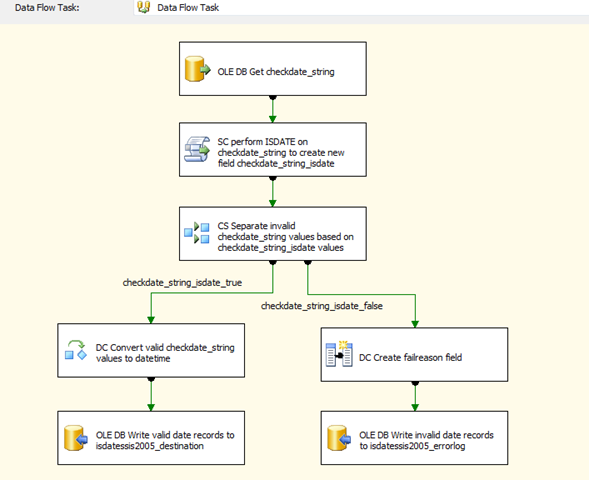
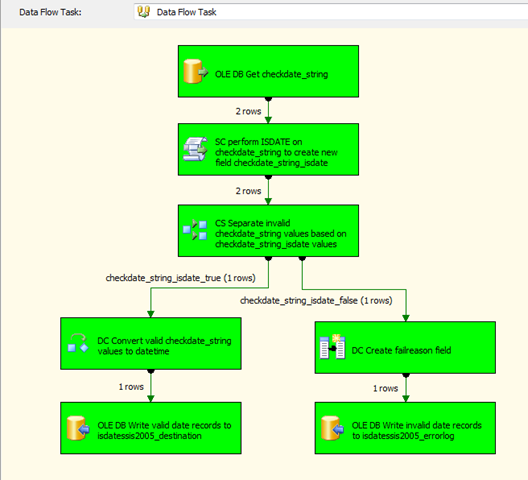
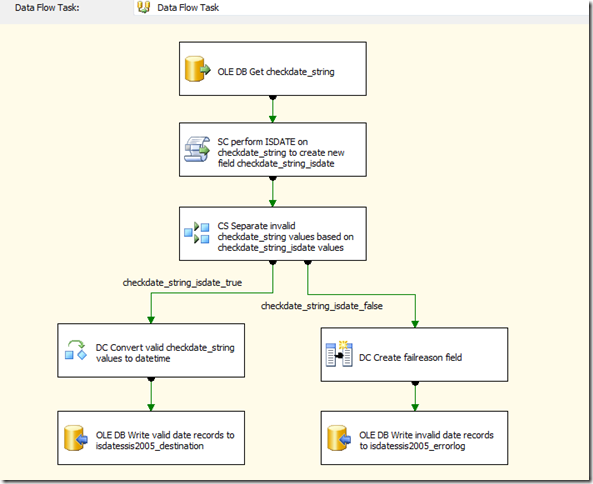
If we were keeping this all in T-SQL, we could just use the ISDATE() function and be on our way. However, SSIS lacks this function natively. Thus, I used the Script Component (transformation) to check for invalid dates, populating a new boolean Output column with the result of the VB ISDATE() function. I then used the Conditional Split to route the valid dates to my destination table and the invalid ones to my errorlog table based on the new boolean field’s value. This worked quite well for me and I was astounded at how easy it was to implement.

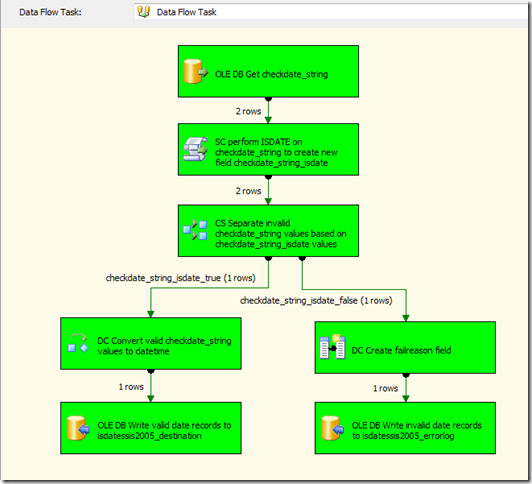
Here is a screenshot of my data flow, which is pretty much self documenting.
image

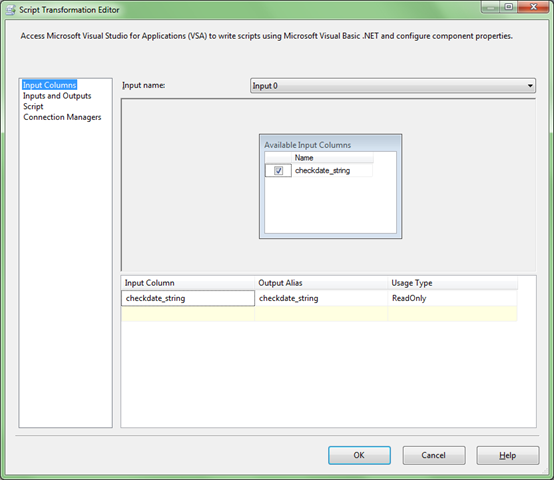
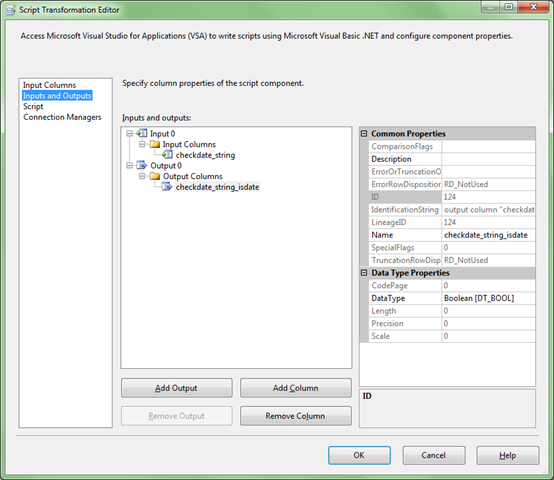
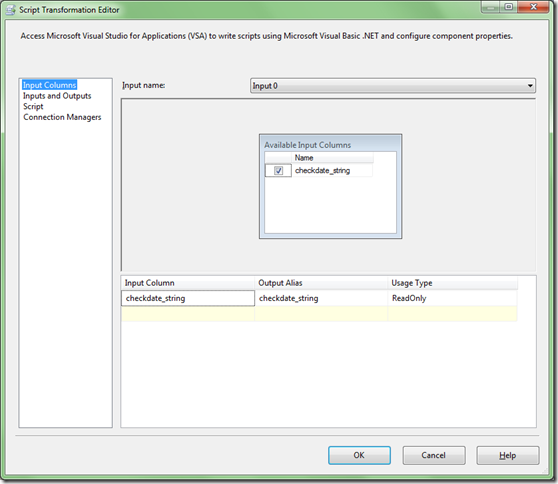
For those unfamiliar with the Script Component (transformation), I was, before doing this, you must choose whether the component will be used as a Source, Destination, or Transformation when you add it to your data flow. For the purposes of this process, you must choose Transformation. Here are screenshots of the Script Component (transformation) properties.
image

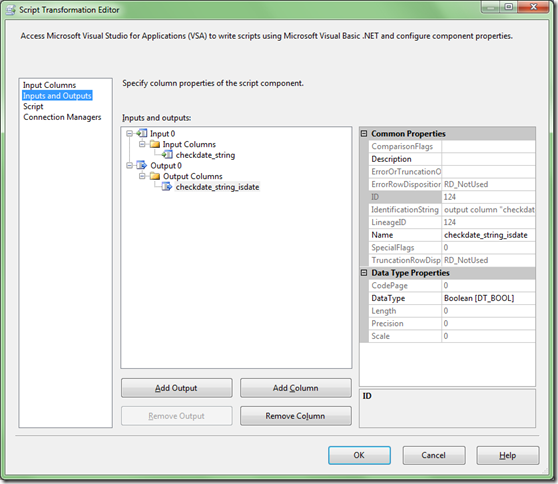
The only input column in our example is the checkdate_string field. The Usage Type defaults to read only and I left it that way.
image

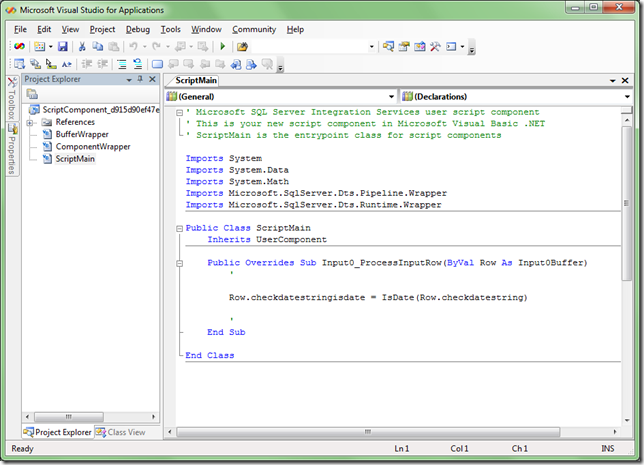
The checkdate_string_isdate field was added as a new column (via Add Column button) and assigned the Boolean Data Type since the VB ISDATE() function returns a boolean result.
image

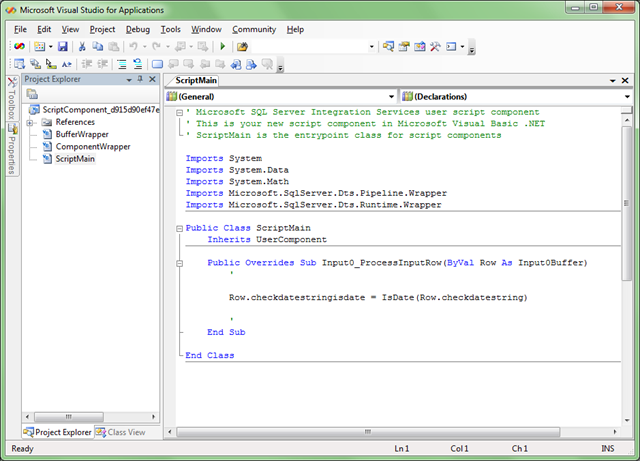
Notice the single line of code:

Row.checkdatestringisdate = IsDate(Row.checkdatestring).

That is seriously the only line of code I had to write. And, thanks to Intellisense, I bagged it on the first try. All it does is set that value of our new boolean output field to the result of the IsDate() function.

When we run our package, we see that our Script Component (transformation) and Conditional Split work just fine indeed.
image

That is really all there is to it. This same technique also works in SSIS 2008, although to use the VB scripting, you will need to change the scripting language in the Script transform from C# (the default) to VB. I poked around with doing this in C# for this post and soon decided that, for the moment, I will leave that to others.

When there are bad dates to be dealt with in a house in Cairo, then Sallah is your man. For SSIS, you can use the Script Component (transformation).

I have included a zip of my SSIS 2005 solution which also includes the .sql file featuring my code snippets shown above. Note that you will need to change the SQL instance in the Adventure Works data source to match your own.

ISDATE Functionality In SSIS Solution Download
Jinkies! Passing MultiValue SSRS Parameters To Stored Procedures

SQL Server Reporting Services provides a great way to allows report users to select more than one value from the available values list in parameters, creating a multivalue parameter.

SSRS dynamically creates a comma separated list of the values selected by the user to pass in to the data source.

Great.

It also dynamically creates the Select All option at the top of the available values list.

Also great.

And, it is really easy to enable this feature.

Also also great.

But this great functionality does have a limitation right out of the box. You cannot pass a multivalue parameter to a stored procedure (see Using Single-Value and Multivalue Parameters).

Ruh roh. Not great.

In the past, I have had the data source sproc return all of the records and then used a filter on the data region to only show the records matching the values selected in the parameter. It got the job done, but returning records you are not going to use is suboptimal, to be sure.

Now, you may be thinking, dear reader, that I am a moron for choosing the above title for this post and then almost right away saying that you cannot do it. Well, provided that your database source is SQL 2005 or later, you actually CAN do it through the beauty of XML. And what is really really cool to me is that the amount of work you must perform to achieve this is miniscule. AND, it does not require much XML expertise, which I must confess, I currently lack. I have seen solutions for this obstacle involving the creation of user-defined functions, but I find this XML solution far more elegant and so easy to implement.

As I often do, I must shout out some thanks to Jason Strate (blog: www.jasonstrate.com, twitter: @stratesql) for showing me this.

You may be asking why I am so fond of having reporting data sources be stored procedures instead of just writing the query right into the report. While that is not truly the scope of this post, I will say that I really like having data access code in the database. Also, the security implications are great, since with sprocs, users need only Execute permission on the sproc and none against the underlying tables. There are other reasons, too, but those two are enough for now.

Setting Up The Data

Let’s start off by creating a table to house our data. I am using AdventureWorks (to make it easy) but creating my own schema (to keep things clean). NOTE: I looked but could not find any ScoobyDoo references in AdventureWorks.

USE AdventureWorks

GO


CREATE SCHEMA MarkVSQL

GO


CREATE TABLE MarkVSQL.ScoobyDooCharacter

(

      CharacterID int not null IDENTITY(1,1)

    , CharacterName varchar(10) not null

)


INSERT INTO MarkVSQL.ScoobyDooCharacter VALUES('Fred')

INSERT INTO MarkVSQL.ScoobyDooCharacter VALUES('Daphne')

INSERT INTO MarkVSQL.ScoobyDooCharacter VALUES('Velma')

INSERT INTO MarkVSQL.ScoobyDooCharacter VALUES('Shaggy')

INSERT INTO MarkVSQL.ScoobyDooCharacter VALUES('Scooby Doo')

NOTE: You may be thinking that Scrappy Doo is conspicuously absent from my list. There is a good reason for that. I can’t stand Scrappy Doo. He drives me nuts. I would rather bite down on a metal fork really hard with my front teeth than watch Scrappy Doo. </Scrappy Doo>

Creating Available Values List

Let’s create the stored procedure that will supply our Character parameter with available values. This is where we start to really have some fun.

CREATE PROCEDURE MarkVSQL.GetMysteryIncMemberList


AS


SELECT

      CharacterName

    , '<Character ID="'

        + CONVERT(varchar,CharacterID)

        + '"/>' AS CharacterIDXML

FROM MarkVSQL.ScoobyDooCharacter

This stored procedure returns the CharacterName along with the CharacterID field that has been modified to return the CharacterID value formatted as an xml node instead of just the int. Here is the fabulous output of our MarkVSQL.GetMysteryIncMemberList sproc.

CharacterName CharacterIDXML

------------- -------------------

Fred          <Character ID="1"/>

Daphne        <Character ID="2"/>

Velma         <Character ID="3"/>

Shaggy        <Character ID="4"/>

Scooby Doo    <Character ID="5"/>

Creating Data Source Sproc 

Now we create the stored procedure that will supply our report with data.

CREATE PROCEDURE MarkVSQL.GetMysteryIncMembers


    @CharacterID varchar(max)


AS


DECLARE @CharacterIDXML xml


SET @CharacterIDXML = REPLACE(@CharacterID,',','')


SELECT

      c.CharacterName

FROM MarkVSQL.ScoobyDooCharacter c

WHERE c.CharacterID IN

    (SELECT c.value('@ID','int') FROM @CharacterIDXML.nodes('//Character') AS x(c))

There are several things to note about this proc:

  • The parameter is a varchar(max) to allow as much space as we can for the string of comma separated XML nodes that SSRS will pass in.
  • We then declare an XML typed variable, @CharacterIDXML.
  • We remove the commas (which SSRS automatically adds as value separators) from the contents of the @CharacterID parameter and put the resulting list of XML nodes in the @CharacterIDXML variable.
  • Our WHERE clause uses the XML “nodes” method to shred out the CharacterID values from the XML.

Let’s run our MarkVSQL.GetMysteryIncMembers sproc with various parameters as they would be passed in from SSRS.

In this example, we just want to return Fred.

EXEC MarkVSQL.GetMysteryIncMembers '<Character ID="1"/>'

We get the following results:

CharacterName

-------------

Fred


(1 row(s) affected)

Now let’s get Fred and Daphne together. I think it is no secret that there is a spark between them.

EXEC MarkVSQL.GetMysteryIncMembers '<Character ID="1"/>,<Character ID="2"/>'

Here they are.

CharacterName

-------------

Fred

Daphne


(2 row(s) affected)

Now let’s get all of those meddling kids and their dog.

EXEC MarkVSQL.GetMysteryIncMembers '<Character ID="1"/>,<Character ID="2"/>,<Character ID="3"/>,<Character ID="4"/>,<Character ID="5"/>'

Here they are, in all of their mystery solving glory.

CharacterName

-------------

Fred

Daphne

Velma

Shaggy

Scooby Doo


(5 row(s) affected)

The configuration of the parameter in SSRS is nothing out of the ordinary, so I don’t feel it is necessary to go into the step by step process here. You can go here if you need more guidance on the SSRS piece, you can go here: Adding Parameters to Your Report. The article in this hyperlink is for 2008 but includes a hyperlink to the 2005 version as well. The configuration goals are the same, but interface differences between 2005 and 2008 make the exact steps a little different.

You just configure the @CharacterID parameter of the report to do the following:

  • Allow multiple values
  • Get its available values from the MarkVSQL.GetMysteryIncMemberList sproc.
  • Use the CharacterName field as the “Label” field so that the user is presented with the list of names.
  • Use the CharacterIDXML field as the “Value” field so that our XML nodes in a comma separated string are passed to the stored MarkVSQL.GetMysteryIncMembers sproc, just like in our examples above.

That’s really all there is to it. Roh boy!